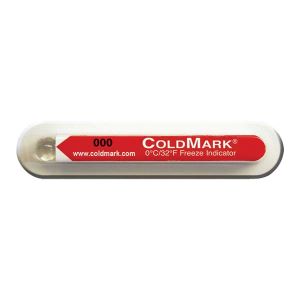
A temperature-sensitive shipment may encounter below-threshold conditions during storage or transport without any visible sign of exposure. When the goods arrive, receiving teams may have limited information when assessing the condition of the shipment.

ColdMark provides a direct visual indication of a below-threshold event. This single-use descending temperature indicator changes irreversibly from clear to violet when temperatures fall below the selected threshold. Five threshold options are available: −3°C, 0°C, 2°C, 5°C and 10°C.

Before shipment, confirm that the bulb is clear and attach the indicator to the monitored product or inside its packaging. No battery, programming or special arming is required. A below-threshold event produces a colour change within 30 minutes or less, with faster response at colder temperatures.

At transfer points or final delivery, the indicator can be inspected without equipment or software. A violet bulb indicates that the selected threshold has been breached. A milky-white bulb means the indicator itself has frozen and also indicates a breach. ColdMark provides a visual threshold indication and does not record a complete temperature history or make an automatic accept-or-reject decision.

Benefit What it means for the user
Straightforward receipt checks Receiving teams can visually determine whether a below-threshold event has occurred.
Multiple threshold options Select an indicator that aligns with the product’s documented temperature limits.
Persistent visual record The colour change remains visible and does not reset after activation.
No electronic set-up Visual checks can be completed without batteries, programming or readers.
Compact adhesive format Position the indicator on a product, carton or shipper for convenient inspection.
Specification ColdMark
Product type Single-use descending temperature indicator
Available temperature thresholds −3°C / 26°F; 0°C / 32°F; 2°C / 36°F; 5°C / 41°F; 10°C / 50°F
Temperature accuracy ±1°C / ±2°F
Visual indication Irreversible clear-to-violet bulb change
Response time 30 minutes or less after exposure below the selected threshold; colder temperatures speed the response
Preparation No battery, programming or special arming required
Mounting method Pressure-sensitive adhesive
Unused indicator storage At least 5°C / 9°F above the indicator’s stated threshold and below 43°C / 110°F
Shelf life 2 years from date of sale
Reuse Single use

Select the ColdMark threshold based on the product’s documented minimum permitted temperature. The threshold indicates the lowest allowable temperature and should not be confused with the recommended shipping temperature.

Model / threshold Product number Use when the product must remain above
ColdMark −3°C / 26°F CM -3/26 −3°C / 26°F
ColdMark 0°C / 32°F CM 0/32 0°C / 32°F
ColdMark 2°C / 36°F CM 2/36 2°C / 36°F
ColdMark 5°C / 41°F CM 5/41 5°C / 41°F
ColdMark 10°C / 50°F CM 10/50 10°C / 50°F

Tài Liệu Sản Phẩm ColdMark: Download

  1. Select the threshold. Choose the model that matches the monitored product’s minimum permitted temperature.
  2. Check the bulb. Before use, confirm that the bulb appears clear. No special arming is required.
  3. Apply the indicator. Peel off the adhesive liner and attach ColdMark to a clean, dry surface on the monitored product or inside its packaging. Keep it visible to the recipient. Do not attach it directly to gel packs or phase-change materials.
  4. Monitor the shipment. If the temperature falls below the selected threshold, the bulb changes from clear to violet within 30 minutes or less. Colder exposure speeds the response.
  5. Inspect during handover or at receipt. A violet bulb indicates below-threshold exposure. A milky-white bulb means the indicator itself has frozen and also indicates a breach; it turns violet as it thaws.
  6. Review the result. Follow the product’s established inspection and disposition procedure. ColdMark provides a visual threshold indication, not a time-stamped temperature record or an automatic acceptance decision.

ColdMark can be used throughout storage, warehousing and distribution networks where products must not experience below-threshold temperatures.

Common applications include:

  • Electronics and industrial components
  • Logistics and warehouse operations
  • Solar energy equipment and components
  • Oil and gas supply chains
  • Pharmaceutical products
  • Diagnostic specimens
  • Chemicals and specialty materials
What should be checked when a shipment arrives?

Inspect the ColdMark bulb. A violet bulb indicates below-threshold exposure. A milky-white bulb indicates the indicator has frozen and also represents a temperature breach.

Can ColdMark be placed inside a shipping package?

Yes. Apply the indicator to a clean, dry surface on the monitored product or inside the package where it remains visible. Avoid direct placement on gel packs or phase-change materials.

Does a clear bulb confirm the shipment remained within specification?

No. A clear bulb means ColdMark did not indicate exposure below its selected threshold. It does not provide a continuous temperature history or establish that every moment stayed within specification.

Can ColdMark data be downloaded for acceptance records?

No. ColdMark provides a visual indication only and does not store downloadable temperature log or timestamps.

How should a model be selected for shipment?

Choose the threshold that matches the product’s documented minimum permitted temperature